Video: CoroCAM 8HD
CoroCAM 8HD camera that sees corona, heat and visible detail simultaneously in daylight, finding discharges and hot joints in one visit. Explains why that matters, how it works, and how to inspect.
CoroCAM 8HD: one camera that sees corona, heat and visible detail at the same time, in daylight. Why that matters, how it works, and how to inspect with it.
AI-generated video. The information must be validated by an Amperis engineer.
Product this video appears on
Video transcript
One camera that sees corona, heat and detail at the same time. Why that matters, how it works, and how to inspect with it. A discharge on high voltage hardware is a symptom: a damaged part, a contaminated surface or a poor design. It wastes power and erodes what surrounds it. A hot joint is another fault, and until now it needed another camera, and another visit. The corona channel works in daylight for a simple reason. Ozone absorbs sunlight below about 280 nanometres,
so at ground level that band is dark. A discharge still emits there, and the camera only looks there. Ultraviolet and visible light enter through one quartz window. The ultraviolet crosses the solar-blind filter, and an image intensifier amplifies what is left. The thermal camera has its own lens. All 3 are aligned on one screen. In figures: an ultraviolet sensitivity of 2.05 times 10 to the minus
18 watts per square centimetre, 3 picocoulombs at 20 metres. Thermal at 640 by 512. And 30 times optical zoom in full HD. Why both? A discharge at an insulator end fitting, with no visible damage, is something to monitor. The same discharge with a hot spot further up the shank points to internal tracking, which fails much sooner. Only the two channels together tell them apart. The large window takes the ultraviolet and the visible,
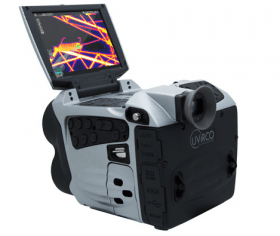
the one below is the thermal lens. Between them, the flashlight and the laser pointer. The screen folds out on top, the grip rotates, and the base plate is the tripod mount and heat sink. From behind: the screen and the viewfinder show the same image, so you can work in bright sun. The power key is in the middle, the sticker lists every key, and the main keypad sits under your thumb.
The connectors sit behind two rubber flaps: power, Ethernet, the micro SD card and serial under one; HDMI, USB, video and the headset under the other. Ethernet lets you control the camera over a network. Charge the batteries for at least 10 hours before first use. Battery in, pin holes facing inwards, then the micro SD card. Hold power for a second. It is usable in 6 seconds, and ready to record when the countdown ends.
Most of the work needs no menu. Plus and minus zoom, up and down focus, left and right set the ultraviolet gain. A short press on record takes a picture, a long press starts a video, and ALT first saves a radiometric file. Gain sets how much the intensifier amplifies. Too little, and a discharge never shows: a no UV flag warns you. Too much, and the noise rises. The count in the corner is the ultraviolet intensity in the sampling area,
and it falls with the square of the distance. For faint discharges or noisy scenes: long integration adds frames, noise reduction averages them, and the threshold hides what is dimmer. Opacity makes the blob solid to search, or transparent to see the hardware behind it. The thermal channel measures. Set the range or let it range automatically, choose a palette,
set emissivity from the built in table and the reflected temperature, and use an isotherm to colour only what matters. Every file leaves with its context: pictures, video and radiometric files, with the settings, the GPS position and the weather data you enter. A 3 digit series number groups the files of one fault, and the reporting software sorts by it. A survey always runs in this order. Search with a solid blob.
Confirm one that keeps coming back. Zoom optically, because digital zoom drops the overlay. Check the thermal image. Make the blob transparent to see the cause. Then record. Priority comes from the damage, not the count. If the discharge cannot harm anything, no action. If it can but there is no damage yet, monitor it. If there is damage, repair at the next shutdown, or schedule an outage if it cannot wait.
Safety and care. The laser is class 3 R: never at people or aircraft. Never point the camera at the sun. The body is sealed, so use the mains supply for long sessions. Keep the window clean, and update the firmware from the SD card. Corona inspection, from Amperis.